
PDF Scanner Mobile Solution
A mobile app that easily transforms your smartphone or tablet into a portable scanner for paper materials. With this app, you can scan any documents, receipts, invoices, cards, books, and QR codes, then edit the scanned files, sign them, convert scanned images into text format, and save your scans for sharing.

Try the app! Download it from the available app stores.
Client
The client, a company specializing in online education, commissioned the development of a PDF scanner designed for scanning documents of various formats using a smartphone camera and further processing of the obtained files.
The initial goal was to create a user-friendly mobile application that would facilitate the educational process for students, making it more comfortable and productive.
- Document Scanning, education, lifestyle
- Mobile app development
- Mobile app promotion
- Swift
- Core Data
- Core Graphics
- Scanning paper materials using a smartphone camera
- Editing and signing scanned documents
- Converting scanned images into text format
- Exporting scanned documents for use and sharing
Concept
Mobile scanners are becoming an integral part of digital life, providing convenience and accessibility to information. Our primary goal was to develop a comprehensive solution with a wide range of features for scanning documents of various formats and editing the obtained files for further use.
Project idea
The creation of the PDF scanner mobile app aimed to simplify the digitalization process, allowing for quick and convenient creation of high-quality document scans anywhere. It converts images into editable formats, which is always relevant for users who value their time and efficiency.
Solution
The project involved the creation of a mobile application for scanning documents using a smartphone camera and converting them into electronic formats. The extensive range of features makes it easy to save, edit, and send scanned files via email, making the document management process more efficient and accessible.
Business value
The development of the PDF scanner mobile app opens new horizons for businesses, providing convenience and efficiency in document management. This digital solution allows for instant digitization, storage, and sharing of important documentation, minimizing the time spent on manual input and processing. The ability to set file protection significantly improves data storage organization and enhances security levels.
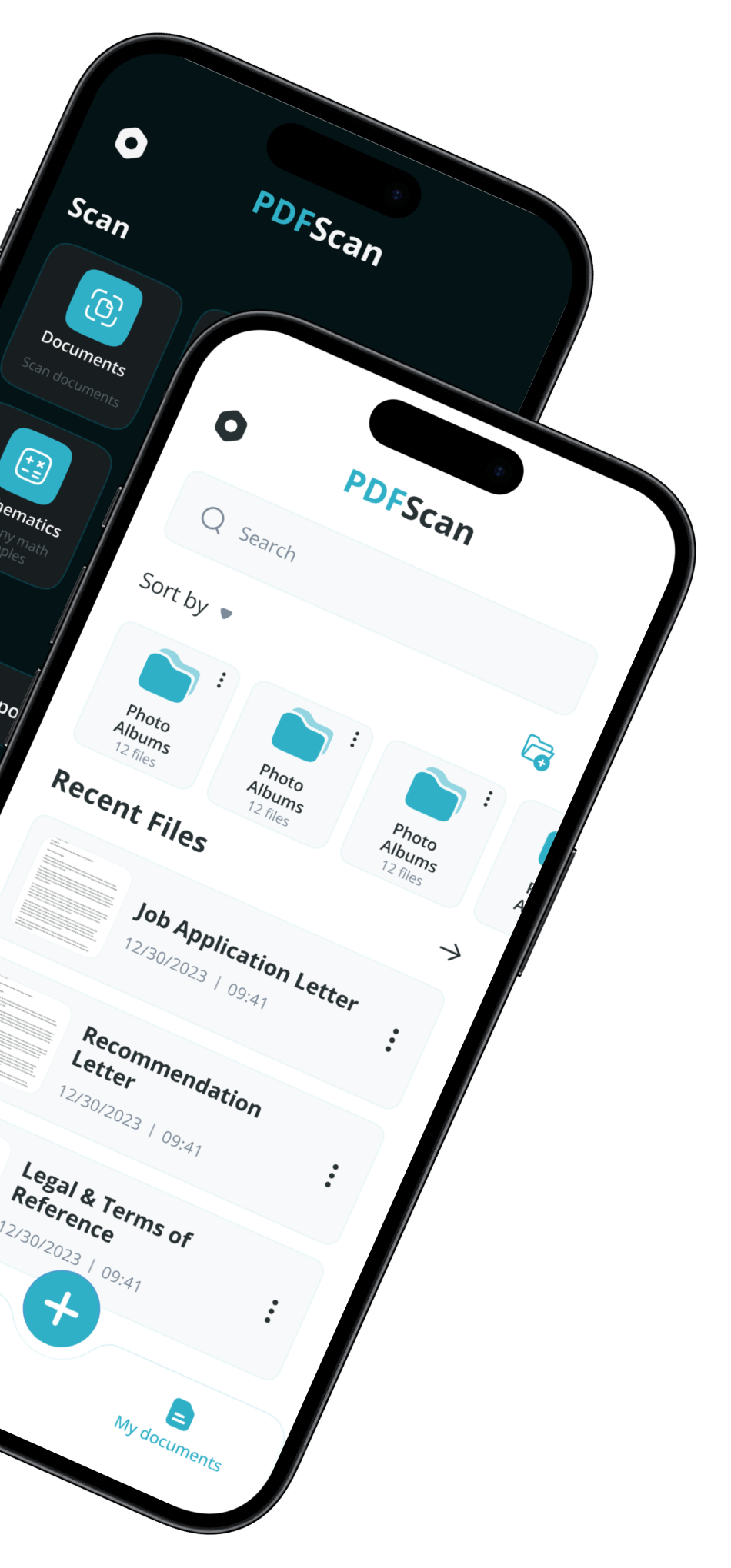
Functionality
Avirise develops custom mobile applications for various industries. We create innovative solutions that fully meet the needs of the target audience, leaving competitors far behind.
Camera Scanning
The mobile app is designed for scanning documents, receipts, invoices, cards, books, and QR codes using the smartphone camera.
Document editor
PDF scanner users can easily make changes to scanned files and add text directly within the app.
Document signing
The app developed by Avirise supports the feature of signing scanned documents for further use.
Highlighting important information
In the text of files scanned using the PDF scanner, any information important to you can be highlighted.
OCR function
With this option, scanned images can be converted into text format, making it possible to search, copy, and paste the text.
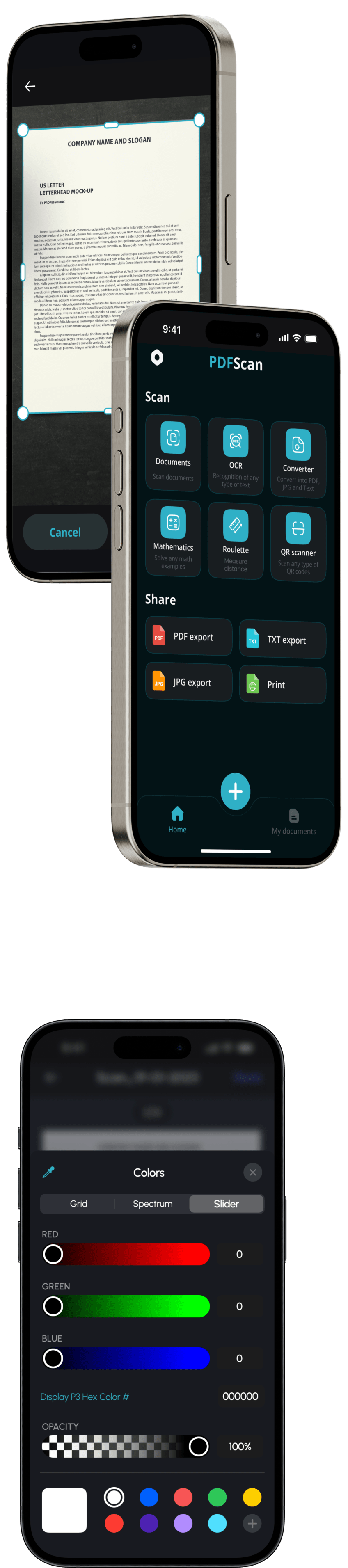
Math function
The mobile app allows scanning of mathematical equations and formulas using the camera of a smartphone or tablet.
Ruler function
The PDF scanner can measure the area or length of objects; the user simply needs to mark the start and end points on the screen.
Document protection
Thanks to the feature of setting a password for document access, confidential files are securely protected after scanning.
Saving in various formats
Documents scanned with the PDF scanner can be saved in various file formats – PDF, JPG, PNG, DOCX, and TXT.
Document export
The document export feature is designed for convenient use and sharing of saved files.
Color themes
The mobile app supports dark and light interface schemes to adapt the appearance according to the user’s preferences.
Functionality
Avirise develops custom mobile applications for various industries. We create innovative solutions that fully meet the needs of the target audience, leaving competitors far behind.
Camera Scanning
The mobile app is designed for scanning documents, receipts, invoices, cards, books, and QR codes using the smartphone camera.
Document editor
PDF scanner users can easily make changes to scanned files and add text directly within the app.
Document signing
The app developed by Avirise supports the feature of signing scanned documents for further use.
Highlighting important information
In the text of files scanned using the PDF scanner, any information important to you can be highlighted.
OCR function
With this option, scanned images can be converted into text format, making it possible to search, copy, and paste the text.
Math function
The mobile app allows scanning of mathematical equations and formulas using the camera of a smartphone or tablet.
Ruler function
The PDF scanner can measure the area or length of objects; the user simply needs to mark the start and end points on the screen.
Document protection
Thanks to the feature of setting a password for document access, confidential files are securely protected after scanning.
Saving in various formats
Documents scanned with the PDF scanner can be saved in various file formats – PDF, JPG, PNG, DOCX, and TXT.
Document export
The document export feature is designed for convenient use and sharing of saved files.
Color themes
The mobile app supports dark and light interface schemes to adapt the appearance according to the user’s preferences.
The story behind the app
Best practices and modern approaches to developing high-quality mobile applications for businesses.
The need for innovation in document management
In today’s world, where speed and efficiency are key factors in both business and everyday life, mobile apps for document scanning using a smartphone or tablet camera have become increasingly relevant. They eliminate the need for unnecessary trips to the office for printing and scanning, which is especially important for students and professionals who need to quickly transmit information and store it in digital format.
Mobile scanning apps offer features for editing scanned files, making important adjustments, and protecting data with password settings, which enhances security. They also provide options for searching and sorting, helping to avoid chaos in the workflow. These apps can easily integrate with other services like email or cloud storage, allowing users to efficiently manage their documents and improve team collaboration.
Moreover, scanning and using documents digitally without printing contributes to reducing paper consumption. This not only saves resources but also helps reduce waste, aligning with modern environmental standards and demonstrating a commitment to environmental responsibility.
How was the mobile app developed?
After the client approached Avirise with a request to develop an app for document scanning and subsequent file management, our team immediately got to work. In the first stage, the Discovery Phase, we thoroughly studied the client’s business, their current needs, and set goals, conducted an analysis of key competitors and their products on the market, evaluating functionality and design. Special attention was given to understanding the target audience’s needs and creating user scenarios.
In the development stage, we implemented the code for the mobile app using technologies such as Swift, Xcode, Core Data, Git, Google Firebase, etc., developed the architecture, and ensured integration with server APIs. This stage also included a range of tasks related to performance optimization, security assurance, and data analytics for app usage.
After completing the development of the PDF scanner mobile app for scanning documents using a smartphone camera and subsequent processing of the scanned files, we moved on to the Design stage. Our team designed the user experience, focusing on the information architecture, and then concentrated on developing visual interface elements, corporate color schemes, fonts, and icons. The process also involved creating screenshots featuring key functions and the app interface for later filling out the app store page.
What work was done before the release?
At Avirise, we put in all our efforts and utilized all the knowledge accumulated over the years to make the PDF scanner app for document scanning user-friendly, intuitive, and indispensable for users from different target segments—students, businesspeople, and professionals.
Publishing an app in the mobile store is impossible without the crucial stage of Testing, which allows for the evaluation of the digital product’s capabilities on various devices to eliminate errors and make improvements. Our team conducted testing in all areas: functionality, performance, usability, security, and compatibility.
Upon completion of testing, we began the final phase, Deploy, aimed at ensuring the PDF scanner’s entry into the market. Our ASO specialist prepared the mobile app description and keywords to describe its features. We created app store pages for publishing the app and submitted it for moderation, which was followed by the much-anticipated release of the PDF scanner. After its launch, the approach to document scanning and working with digitized information began to change, with many noting the time saved and the convenience of managing paper materials.
The need for innovation in document management
In today’s world, where speed and efficiency are key factors in both business and everyday life, mobile apps for document scanning using a smartphone or tablet camera have become increasingly relevant. They eliminate the need for unnecessary trips to the office for printing and scanning, which is especially important for students and professionals who need to quickly transmit information and store it in digital format.
Mobile scanning apps offer features for editing scanned files, making important adjustments, and protecting data with password settings, which enhances security. They also provide options for searching and sorting, helping to avoid chaos in the workflow. These apps can easily integrate with other services like email or cloud storage, allowing users to efficiently manage their documents and improve team collaboration.
Moreover, scanning and using documents digitally without printing contributes to reducing paper consumption. This not only saves resources but also helps reduce waste, aligning with modern environmental standards and demonstrating a commitment to environmental responsibility.
How was the mobile app developed?
After the client approached Avirise with a request to develop an app for document scanning and subsequent file management, our team immediately got to work. In the first stage, the Discovery Phase, we thoroughly studied the client’s business, their current needs, and set goals, conducted an analysis of key competitors and their products on the market, evaluating functionality and design. Special attention was given to understanding the target audience’s needs and creating user scenarios.
In the development stage, we implemented the code for the mobile app using technologies such as Swift, Xcode, Core Data, Git, Google Firebase, etc., developed the architecture, and ensured integration with server APIs. This stage also included a range of tasks related to performance optimization, security assurance, and data analytics for app usage.
After completing the development of the PDF scanner mobile app for scanning documents using a smartphone camera and subsequent processing of the scanned files, we moved on to the Design stage. Our team designed the user experience, focusing on the information architecture, and then concentrated on developing visual interface elements, corporate color schemes, fonts, and icons. The process also involved creating screenshots featuring key functions and the app interface for later filling out the app store page.
What work was done before the release?
At Avirise, we put in all our efforts and utilized all the knowledge accumulated over the years to make the PDF scanner app for document scanning user-friendly, intuitive, and indispensable for users from different target segments—students, businesspeople, and professionals.
Publishing an app in the mobile store is impossible without the crucial stage of Testing, which allows for the evaluation of the digital product’s capabilities on various devices to eliminate errors and make improvements. Our team conducted testing in all areas: functionality, performance, usability, security, and compatibility.
Upon completion of testing, we began the final phase, Deploy, aimed at ensuring the PDF scanner’s entry into the market. Our ASO specialist prepared the mobile app description and keywords to describe its features. We created app store pages for publishing the app and submitted it for moderation, which was followed by the much-anticipated release of the PDF scanner. After its launch, the approach to document scanning and working with digitized information began to change, with many noting the time saved and the convenience of managing paper materials.
Tasks and innovations
The idea behind developing the PDF scanner app for document scanning and file processing was driven by the needs of an online school and aligned with the requirements of both the target audience and the business. A digital product of this nature is not only a relevant solution for working with digitized information but also a tool for effective and reliable document management in everyday life, ensuring an organized workflow without chaos.
Scanning documents using a smartphone camera significantly reduces the time spent on paperwork. With just a simple photo, the document is saved in a digital format, ready for editing, saving, or sharing. This reduces the time needed for document handling, making the process more efficient, as well as fast and secure—an essential aspect in our fast-paced world.
The creation of the PDF scanner mobile app represents a step towards simplifying users’ lives in the digital age. During its development, our team faced the need to implement innovations that would meet the needs of a wide range of users. Therefore, we created a multifunctional product based on Swift: this programming language by Apple is widely used for iOS and macOS applications, providing high performance and seamless integration with the platform. To store data on the device, we utilized Apple’s Core Data framework, and for rendering 2D graphics and working with PDF documents, we employed Core Graphics.
Results
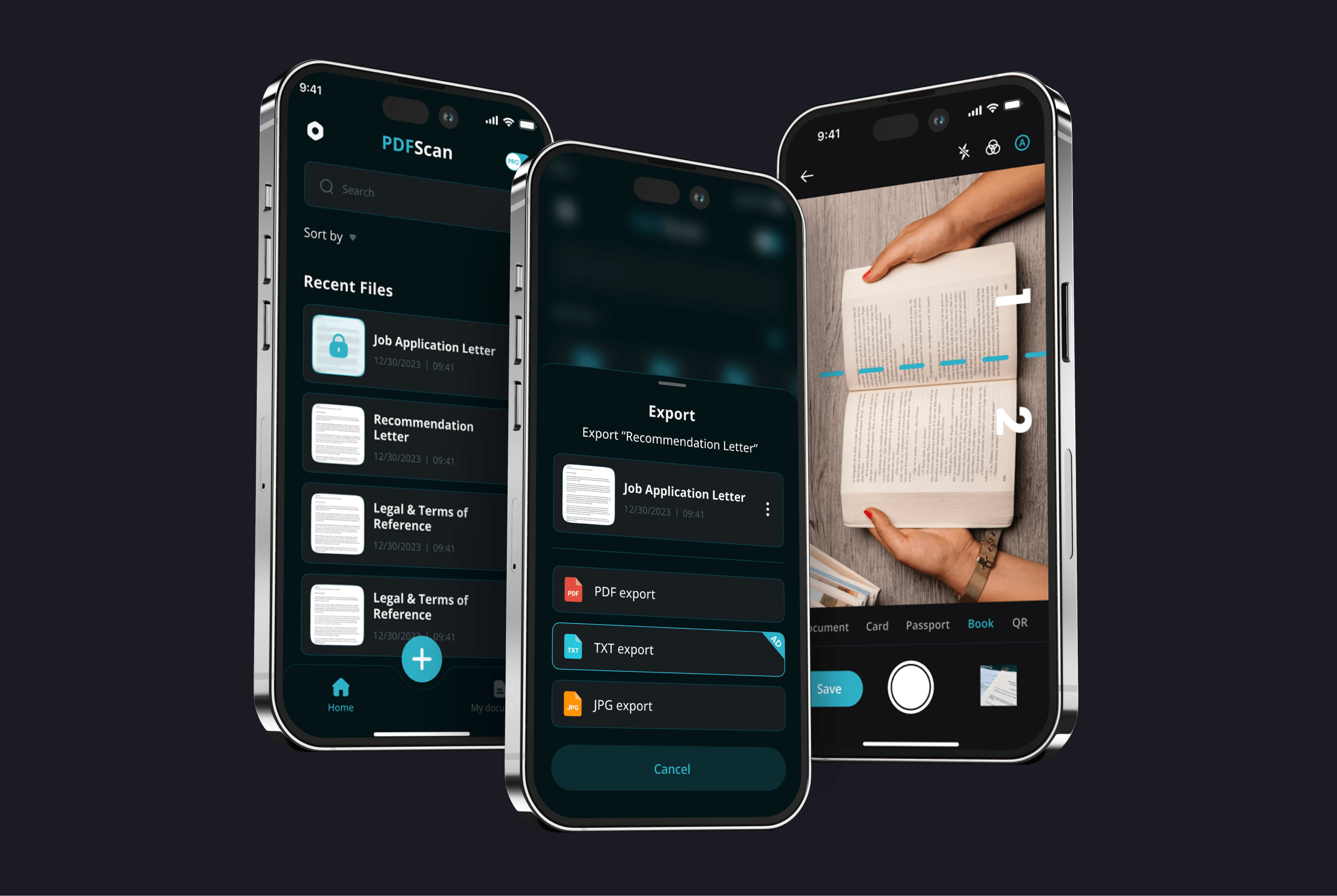
The Avirise team developed a PDF scanner app that includes:
Scanning documents, receipts, books, cards, QR codes, and mathematical formulas using a smartphone or tablet camera, enabling the easy creation of electronic copies of various paper materials anytime and anywhere.
Further processing of documents, allowing users to edit scanned files directly within the app, add text, make important annotations, draw, sign, and much more.
Additionally, with the OCR feature, the app enables converting scanned images into text, saving scans in various formats, sharing files, and setting password protection on them.
Request a callback to get answers to your questions and start collaborating with us.
Ready to start working with Avirise?
Request a callback to get answers to your questions and start collaborating with us.
Frequently asked questions about mobile app development
Why should you choose Avirise for app development?
Avirise specializes in creating innovative, reliable, and highly efficient mobile applications, providing clients with access to all the advantages of cutting-edge technology, a successful market launch, and increased business profitability. With years of experience, we know how to develop a product that will surpass competitors, even those at the top of your chosen niche, while fully satisfying the needs of your target audience. Our goal is your success!
What does Avirise offer in app development?
Our cross-functional team has successfully delivered projects of various formats across multiple industries for over 4 years. We develop simple applications as well as tackle more complex tasks that involve advanced functionality and intricate design. Our services encompass the entire digital product development cycle—from design to app store publication. Additionally, we offer comprehensive support after the app’s release, ensuring assistance throughout the entire product lifecycle, along with promotional services to boost downloads, achieve high ratings, and garner positive user reviews. We practice an individualized approach, fully focusing on our client’s unique needs. Our primary objective is to help you achieve your business goals and increase your profitability through the creation of effective mobile applications.
What is the cost of mobile app development at Avirise?
The cost of creating a mobile application is not fixed and is calculated individually. If you request the development of a complex, multifunctional product, you should be prepared for higher resource expenditures, which will impact the overall service cost. The final amount is determined by factors such as the list of features supported by the app, the method of implementation, the uniqueness and complexity of the design concept, and user-friendliness. Our manager will provide you with an exact project cost during a free consultation. Contact them to receive a budget estimate and answers to all your questions.
How long does it take to develop an app at Avirise?
The time required to complete a project depends on its complexity. Developing a simple app can take just a few weeks. However, if you’re aiming for a complex product with numerous diverse features, the process may extend over several months. The project duration also depends on the chosen technologies. A minimum viable product (MVP) can be ready in about a month. However, scaling it into a full-fledged product ready for release may take around nine months, as this process includes multiple testing stages to identify and eliminate potential errors. Additionally, there will be functionality enhancements and user interface improvements to consider.